The story began when I noticed that I needed hierarchical data for most of my backend ideas.
For example, a platform for TV shows where I need a category for the type of show, like drama or action, then a subcategory for the country, and then the release year. For instance, Drama > Turkey > 2026
Another example is when I want to make an e-commerce store and I need categories. Example:
How can I build categories in a relational database with only rows and columns?
Should I create a table called category1 and another table called category2 and so on...? It just doesn't work.
First, we need to know how to represent the categories in code before thinking about the database. What we're trying to represent isn't just categories; it's called a tree.
Representing the Tree at the Application Level A tree is a data structure you might have encountered if you took a data structures course in college. The idea is simple; it's very similar to a linked list.
A linked list is simply a collection of nodes, where each node points to the next node, it's similar to an array, but it solves some of its limitations, such as being dynamic, and having faster insertion and deletion, etc.
So if you have a linked list with 2 nodes, it's basically like a tree with only one child.
The difference between a tree and a linked list is that a tree contains nodes where each node points to an array containing the addresses of its children. Now we have a tree!
This tree is called an N-ary tree, meaning each node can have 'n' number of children.
And this is exactly what we need — unlike the binary tree, where each node is limited to only two children.
import java.util.ArrayList;
import java.util.List;

public class Node<T> {
    private T data;
    private List<Node<T>> children;

    // Constructor
    public Node(T data) {
        this.data = data;
        this.children = new ArrayList<>();
    }

    public void addChild(Node<T> child) {
        this.children.add(child);
    }

    public T getData() {
        return data;
    }

    public List<Node<T>> getChildren() {
        return children;
    }
}
This is how the N-ary tree is represented.
I used Java, but the representation will be similar in any language that supports OOP, such as JavaScript, Python, PHP, etc., as is the case with most programming languages.
Simply put, we can build the tree as follows:
import com.fasterxml.jackson.databind.ObjectMapper;
import com.fasterxml.jackson.databind.SerializationFeature;

public class ElectronicsStore {
    public static void main(String[] args) {
        try {
            Node<String> electronics = new Node<>("Electronics");
            Node<String> mobiles = new Node<>("Mobiles");
            Node<String> laptops = new Node<>("Laptops");
            Node<String> watches = new Node<>("Smartwatches");

            mobiles.addChild(new Node<>("iPhone 15 Pro"));
            mobiles.addChild(new Node<>("Samsung Galaxy S24"));

            laptops.addChild(new Node<>("MacBook Pro M3"));
            laptops.addChild(new Node<>("Dell XPS 15"));

            electronics.addChild(mobiles);
            electronics.addChild(laptops);
            electronics.addChild(watches);

        } catch (Exception e) {
            e.printStackTrace();
        }
    }
}
Then, we can serialize it into a JSON format ready for the frontend:
import com.fasterxml.jackson.databind.ObjectMapper;
import com.fasterxml.jackson.databind.SerializationFeature;

public class ElectronicsStore {
    public static void main(String[] args) {
        try {
            Node<String> electronics = new Node<>("Electronics");
            Node<String> mobiles = new Node<>("Mobiles");
            Node<String> laptops = new Node<>("Laptops");
            Node<String> watches = new Node<>("Smartwatches");

            mobiles.addChild(new Node<>("iPhone 15 Pro"));
            mobiles.addChild(new Node<>("Samsung Galaxy S24"));

            laptops.addChild(new Node<>("MacBook Pro M3"));
            laptops.addChild(new Node<>("Dell XPS 15"));

            electronics.addChild(mobiles);
            electronics.addChild(laptops);
            electronics.addChild(watches);

            ObjectMapper mapper = new ObjectMapper();
            mapper.enable(SerializationFeature.INDENT_OUTPUT);
            String jsonOutput = mapper.writeValueAsString(electronics);

            System.out.println(jsonOutput);

        } catch (Exception e) {
            e.printStackTrace();
        }
    }
}
Or simply in JavaScript:
const response = JSON.stringify(tree)These libraries use a Depth-First Traversal (DFS) algorithm to traverse the tree's depth and construct the JSON structure. The resulting JSON would look like this:
[
  {
    "id": 1,
    "nameAr": "إلكترونيات",
    "nameEn": "Electronics",
    "slug": "electronics",
    "children": [
      {
        "id": 2,
        "nameAr": "جوالات",
        "nameEn": "Mobiles",
        "slug": "mobiles",
        "children": [
          {
            "id": 4,
            "nameAr": "آيفون",
            "nameEn": "iPhone",
            "slug": "iphone",
            "children": []
          },
          {
            "id": 5,
            "nameAr": "سامسونج",
            "nameEn": "Samsung",
            "slug": "samsung",
            "children": []
          },
        ]
      },
      {
        "id": 3,
        "nameAr": "حواسيب",
        "nameEn": "Computers",
        "slug": "computers",
        "children": [
          {
            "id": 6,
            "nameAr": "ماك بوك",
            "nameEn": "MacBook",
            "slug": "macbook",
            "children": []
          },
          {
            "id": 7,
            "nameAr": "ديل",
            "nameEn": "Dell",
            "slug": "dell",
            "children": []
          }
        ]
      }
    ]
  }
]But the most critical question remains: how do we represent this tree in a relational database? While we have already represented it at the application level, we also need to persist it in the database. There are several approaches to achieving this:
Each method comes with its own set of pros and cons.
I opted for the Adjacency List method, as it is the most widely used and is suitable for 90% of use cases.
| id | name | parent_id |
|---|---|---|
| 1 | Electronics | NULL |
| 2 | Mobiles | 1 |
| 3 | Laptops | 1 |
| 4 | Smartwatches | 1 |
| 5 | iPhone 15 Pro | 2 |
| 6 | Samsung Galaxy S24 | 2 |
| 7 | MacBook Pro M3 | 3 |
| 8 | Dell XPS 15 | 3 |
The table includes a parent_id column where each node stores the ID of its parent. If the value is NULL, it indicates that the node is the root. This method is widely popular due to its simplicity. Like any other approach, it has its own advantages and disadvantages, which I will discuss in detail at the end of this article.
Simply, we fetch the entire tree:
SELECT * FROM categories;Now that we have all the data we need, the second most critical question arises: how do we actually build the tree to output it as JSON? In other words, how do we transform these flat database rows into objects like we created earlier, so they are ready for JSON serialization?
Usually, we use an ORM. If you've defined the relationships, it will display the tree as JSON, but we'll run into the N+1 problem. This happens because the ORM fetches all descendants through multiple queries. For instance, if you have a tree with 10 children, it will execute one query for the root, 10 for the children, and one more to verify that the children have no further descendants resulting in 12 queries! This is a very inefficient approach.
The best way is to fetch the entire tree without letting the ORM build the hierarchy for us.
List<Category> list = repo.findAll();Now we have a list of objects that contains the complete tree.
Now, we need to use a specific algorithm to convert these rows into objects. Since we know the parent of each node, we can iterate through all the rows using a for-loop.
If the parent_id is null, it means this node is a root, so we add it to a new list. If the value is not null, it means the node has a parent; in this case, we find the parent using the ID matching the parent_id and then place the child into the children's list inside that parent. This algorithm is simple and is commonly known as Flat List to Tree.
public List<CategoryDTO> getTree(@NonNull List<Category> all) {

    List<CategoryDTO> roots = new ArrayList<>();

    for (Category c : all) {
        CategoryDTO dto = map.get(c.getId());
        if (c.getParentId() == null) {
            roots.add(dto);
        } else {
        // Node has a parent_id
        // We need to find the parent
        }
    }
    return roots;
}
The loop goes through the nodes, adding those without a parent to the ‘roots’ list. For those with a parent_id, we find the parent to link them. But should we add a second loop for that? Definitely not—that would drive the complexity to O(n^2).
If you have 10 nodes, and each one needs to search for its parent among those 10
That's 10 * 10 = 100 operations.
But if you have 100 nodes: 100 * 100 = 10,000 operations.
And if you have 1,000 nodes: 1,000 * 1,000 = 1,000,000 operations!
The algorithm grows quadratically, so it isn't scalable. The solution is to use a HashMap instead of a nested loop, allowing us to reach the parent in constant time O(1).
public List<CategoryDTO> getTree(@NonNull List<Category> all) {
    Map<Long, CategoryDTO> map = all.stream()
            .collect(Collectors.toMap(
                    Category::getId,
                    c -> new CategoryDTO(c.getId(), c.getNameAr(), c.getNameEn(), c.getSlug(), new ArrayList<>())
            ));

    List<CategoryDTO> roots = new ArrayList<>();

    for (Category c : all) {
        CategoryDTO dto = map.get(c.getId());
        if (c.getParentId() == null) {
            roots.add(dto);
        } else {
            CategoryDTO parent = map.get(c.getParentId());
            if (parent != null) {
                parent.children().add(dto);
            } else {
                roots.add(map.get(c.getId()));
            }
        }
    }
    return roots;
}
That's the Flat List to Tree Algorithm.
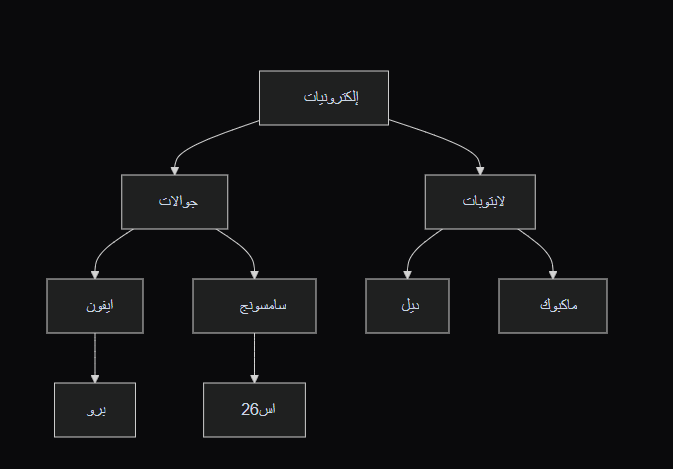
Suppose I want to fetch a sub-tree, like 'Mobile Phones' — how do I do that? I could pull the entire 'Electronics' tree from the database and then just send the 'Mobile Phones' sub-branch to the user, but what if the database contains thousands of categories?
The solution is to use recursion. Let's assume the 'Mobile Phones' category has an ID = 1. We fetch every row where the parent_id = 1, which would return only 'Samsung' and 'iPhone.' However, since they have descendants, we'd run another query to fetch their children, and so on.
The advantages of the Adjacency List method we used are:
Cons:
When fetching a sub-tree, you need to use the recursion feature in MySQL 8 (Recursive CTEs), which can be CPU-intensive compared to other methods.
I chose it because it’s simple, and most projects only require a tree depth of 3–5 levels at most. For instance, the category tree on a site like Noon has a depth of only 3.
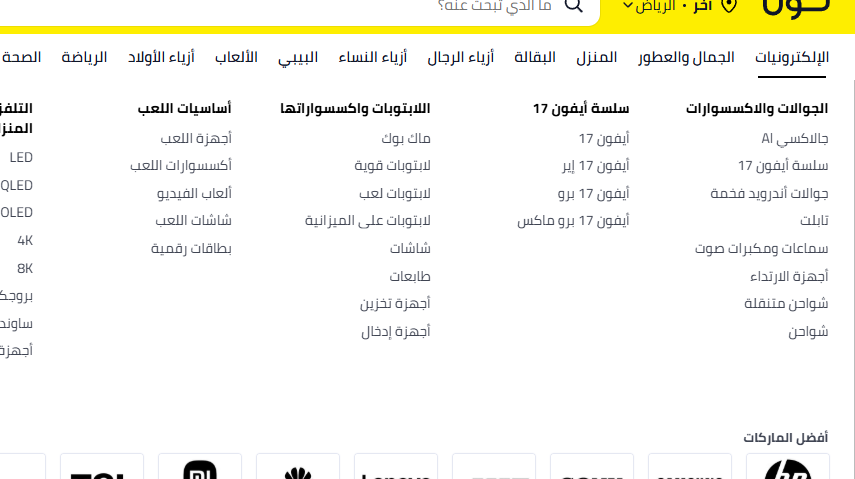
You might look at filters and think they are categories, but they are actually Attributes stored in a separate table. For this reason, this approach is more than sufficient.
In the frontend, we use Pre-order Depth-First Traversal (DFT):
const TreeNode = ({ node }) => {
  return (
    <div style={{ marginLeft: "20px", borderLeft: "1px dashed #ccc", paddingLeft: "10px" }}>
      <div style={{ padding: "5px 0" }}>
        {node.children ? "📁" : "📄"} {node.name}
      </div>

      {node.children && (
        <div>
          {node.children.map((child) => (
            <TreeNode key={child.name} node={child} />
          ))}
        </div>
      )}
    </div>
  );
};
export default function SimpleTree() {
  return <TreeNode node={treeData} />;
}I haven't found anyone covering this topic all the way from the application layer to the database, converting the tree in the application, and finally displaying it on the frontend.
Honestly, I’m surprised because it’s a vital topic; any backend engineer will eventually need to represent a tree in a relational database. There are articles that discuss the Adjacency List in isolation, and others that talk about the Flat List to Tree algorithm.
I implemented the backend in Java (though it can be applied to any language), and I also built the frontend.
Backend: Category system
Frontend: Mega menu
© 2026 فيصل الحربي
.
faisalalharbi9915@gmail.com
.
القصيم 🇸🇦